# Create directory and project folder
mkdir my-virtual-machine && cd my-virtual-machine && pulumi new vm-aws-python
# Create and configure a new stack
pulumi stack init dev
pulumi config set aws:region us-east-2
# Preview and run the deployment
pulumi up
# Remove the app
pulumi destroy
pulumi stack rm3 Dev-Ops for Data Scientists
Overview and Best Practices
3.1 dev-ops is…?
“… a set of cultural norms, practices, and supporting tooling to help make the process of developing and deploying software smoother and lower risk.”
Let’s get into it. We’re at a DevOps workshop - so what is it. This is a best effort attempt but its still a squishy broad buzz word that’s defined differently across organization.
3.2
Developing and Deploying Software
3.3 Waterfall Model of Software Development
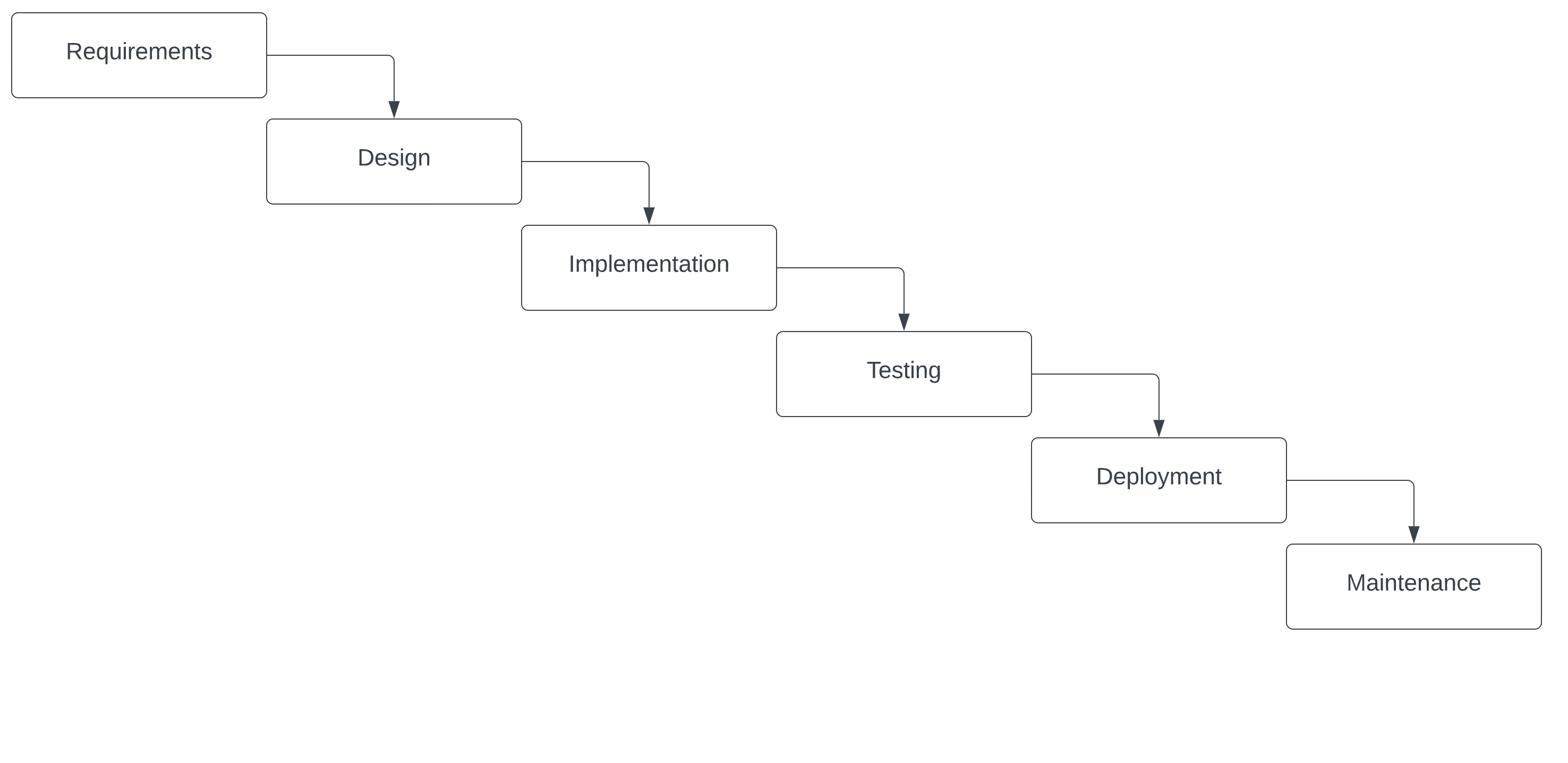
Devops became popular in the 2007-2009, across social media, twitter tag #devops was popular, online communities and became more organized through conferences, workshops, and grassroots attempts at implementation at diff companies.
old-school model from the 1970’s; each part has to be completed before you go on to the next one, very rigid and linear
can’t move forward until you finish each step and then you can’t go back if there’s a big introduced
Benefits - there’s clear structure, fixed costs, process can be replicated Costs - long delivery times, limited innovation, limited flexibility
3.4 Where the waterfall model fails
The time gap: A developer may work on code that takes days, weeks, or even months to go into production.
The personnel gap: Developers write code, ops engineers deploy it.
The tools gap: Developers may be using a stack like Nginx, SQLite, and OS X, while the production deploy uses Apache, MySQL, and Linux.
3.5 Agile Model
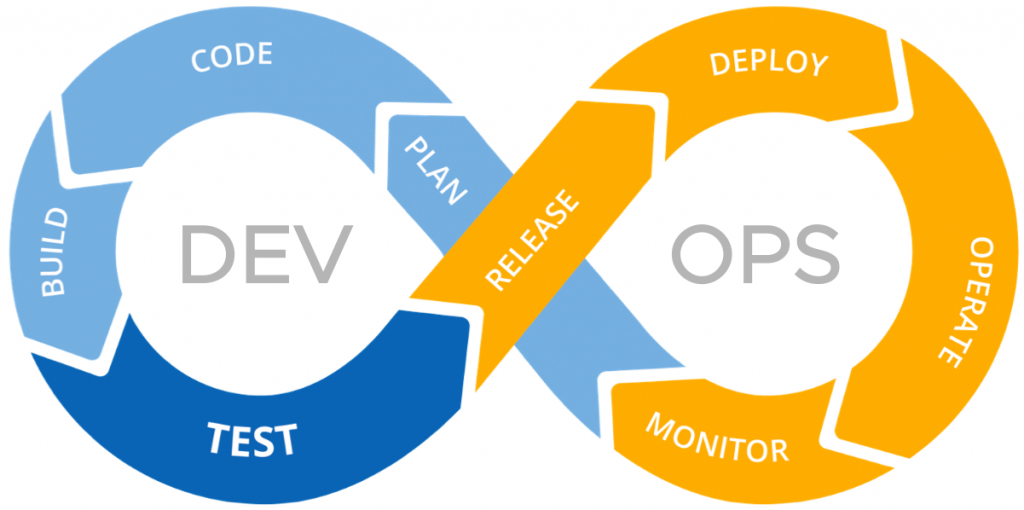
teams work in a cycle of planning, executing, and evaluating, iterating as they go.
continuous feedback loops, more communication between teams, adaptability to changes
3.6
Smoother and lower risk
3.7 Problems dev-ops tries to solve
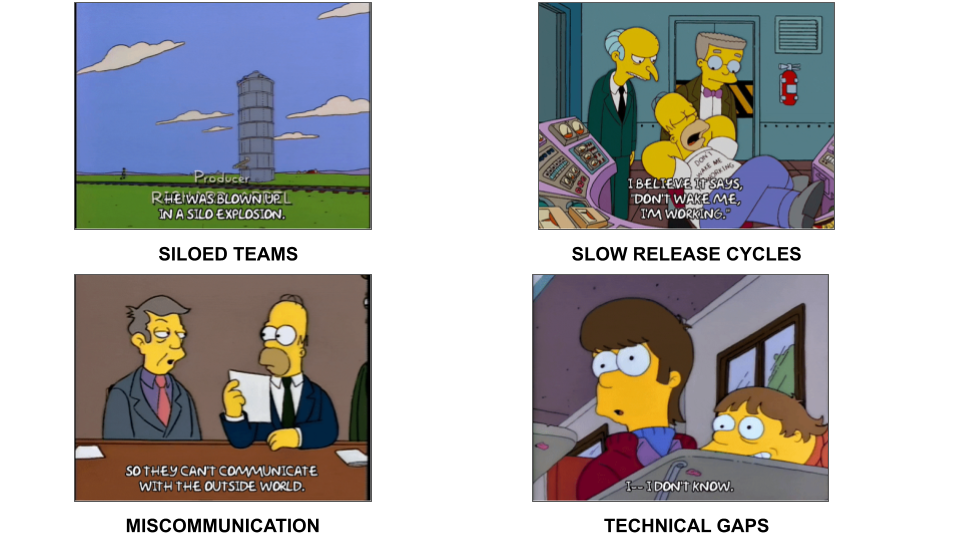
You want to make the release process as fast as possible but you also want it to be tested and free of bugs. And this introduces a natural conflict between speed and stability
You have the same goals of speed and accuracy - but this process of continuous integration, of testing, of automating processes so that your users can get their hands on the app - didnt exist.
One problem is that the entire process is siloed between the creation of the code and the deployment of your app. So your developers finish their code and then throw it over the fence to ops. Maybe they then throw it to security or to QA. But there was no formal alliance in place or processes on how the teams work together. Because each team is seemingly working on one part - the code vs. the deploy - there’s also technical knowledge siloes - each team only knows their bit but not anything else.
So imagine this stock trading app - your developers are creating cool new features so that you can easily buy and sell stock, maybe even see data on whats happening in the market. But they’re not necessarily thinking about how the app is secured or if its compliant with federal regulations or if user data is protected. Obvi this is a worst case scenario - but you get the picture.
So as the app is built it keeps getting thrown back and forth between the two teams and leads to one of the major problems that devops is trying to fix - really slow and manual bureaucratic release process.
On the technical side, a lot of the actual work is done manually. So you can imagine one team running tests manually in one environment - maybe the environment itself is created manually, or someone manually sizing up or fixing a server. This takes time, you need to get approval from people, and its not easily reproduced or really documented anywhere. Also, there is a lot of room for error and if things break its not easy to roll back bugs.
Problem becomes how do you automate this release process, make it streamlined, less error prone, improve how all these teams integrate and operate, and at the end of the day make the process of getting the app into the hands of your users much faster.
3.8
Cultural Norms
3.9 Instilling a sense of …
- collaboration
- transparency
- continuous feedback
- shared responsibility
- and most importantly…

toolss for cultural change - code review - cross team blameless retros - project kickoffs - everyone owns the process - balance between security and operations - iterative building, making mistakes early and often - identify sources of resistance - get leadership buy-in - design for autonomy - measure output not compliance
3.10 💬 Discussion
What’s the dev-ops culture like where you work?
3.11
Practices and supporting tooling
3.12 Proliferation of tools
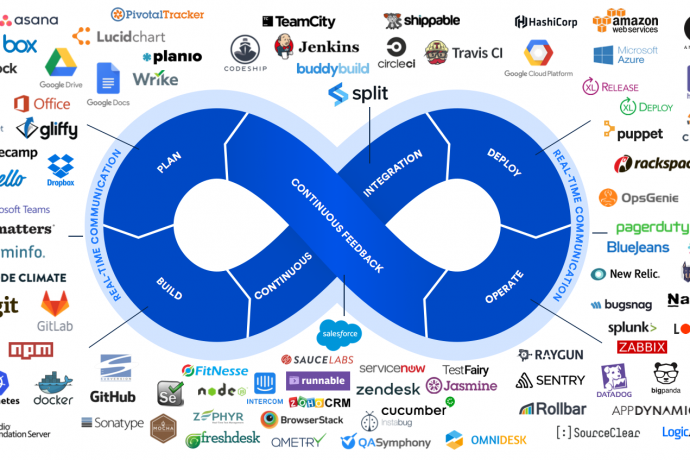
proliferation of tools, source code management, repo management, build tools, data management, deployment, container services, config management, monitoring, cloud services
3.13 Best Practices > Tools
- Codebase - One codebase tracked in revision control, many deploys
- Dependencies - Explicitly declare and isolate dependencies
- Config - Store config in the environment
- Backing services - Treat backing services as attached resources
- Build, release, run - Strictly separate build and run stages
- Processes - Execute the app as one or more stateless processes
- Port binding - Export services via port binding
- Concurrency - Scale out via the process model
- Disposability - Maximize robustness with fast startup and graceful shutdown
- Dev/prod/ parity - Keep development, staging, and production as similar as possible
- Logs - Treat logs as event streams
- Admin processes - Run admin/management tasks as one-off processes
2011 by Adam Wiggins - founder of heroku. The 12 Factor App is a set of principles that describes a way of making software that, when followed, enables companies to create code that can be released reliably, scaled quickly, and maintained in a consistent and predictable manner.
Nice baseline for building portable and resilent applications
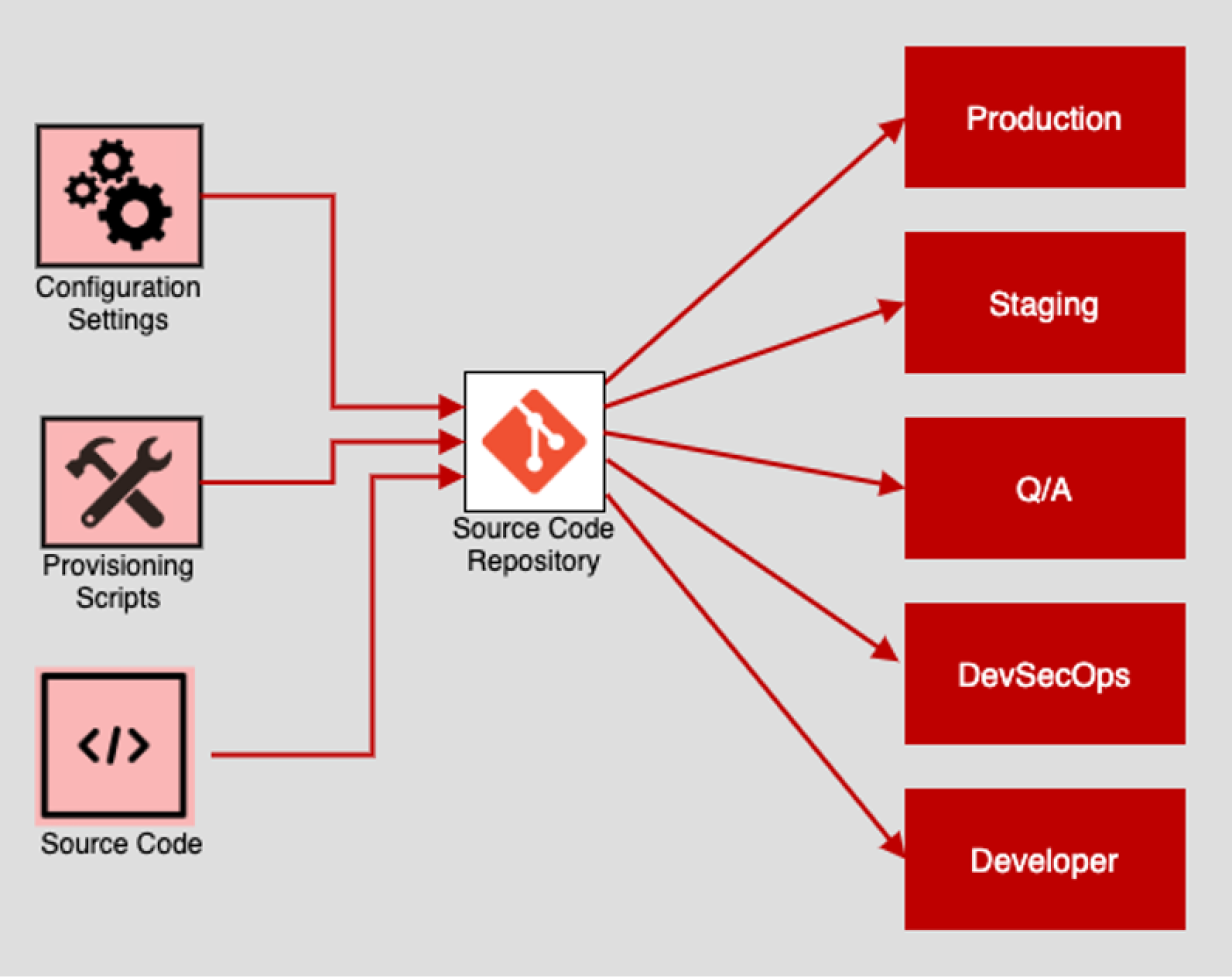
3.14 Codebase
There should be exactly one codebase for a deployed service with the codebase being used for many deployments.
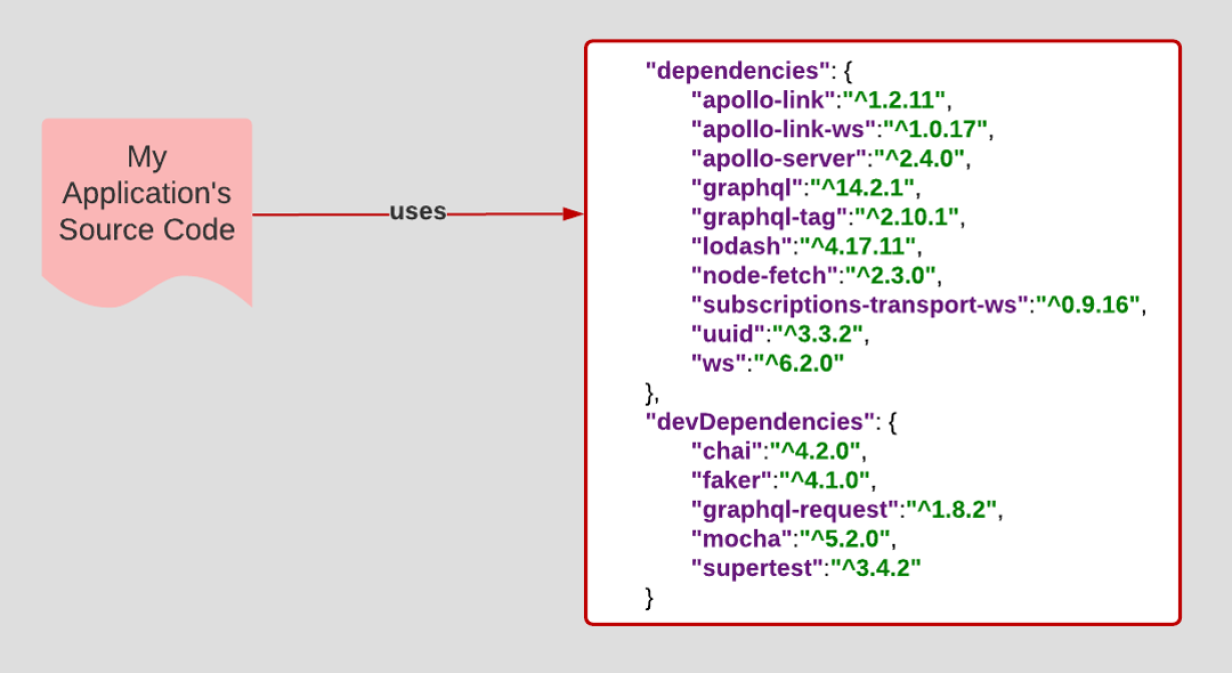
3.15 Dependencies
All dependencies should be declared, with no implicit reliance on system tools or libraries.
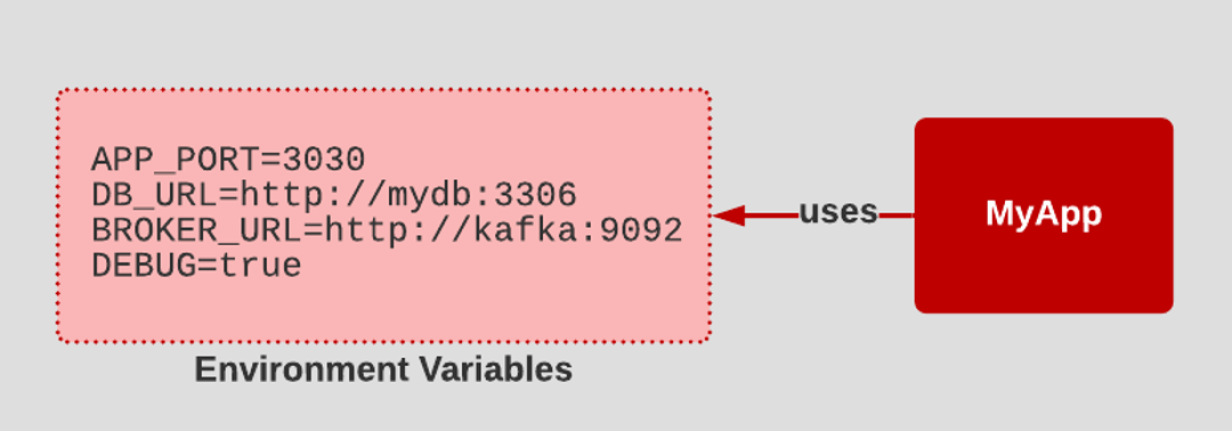
3.16 Config
- Configuration that varies between deployments should be stored in the environment.
- A litmus test for whether an app has all config correctly factored out of the code is whether the codebase could be made open source at any moment, without compromising any credentials.
3.17 Backing services
All backing services are treated as attached resources and attached and detached by the execution environment. 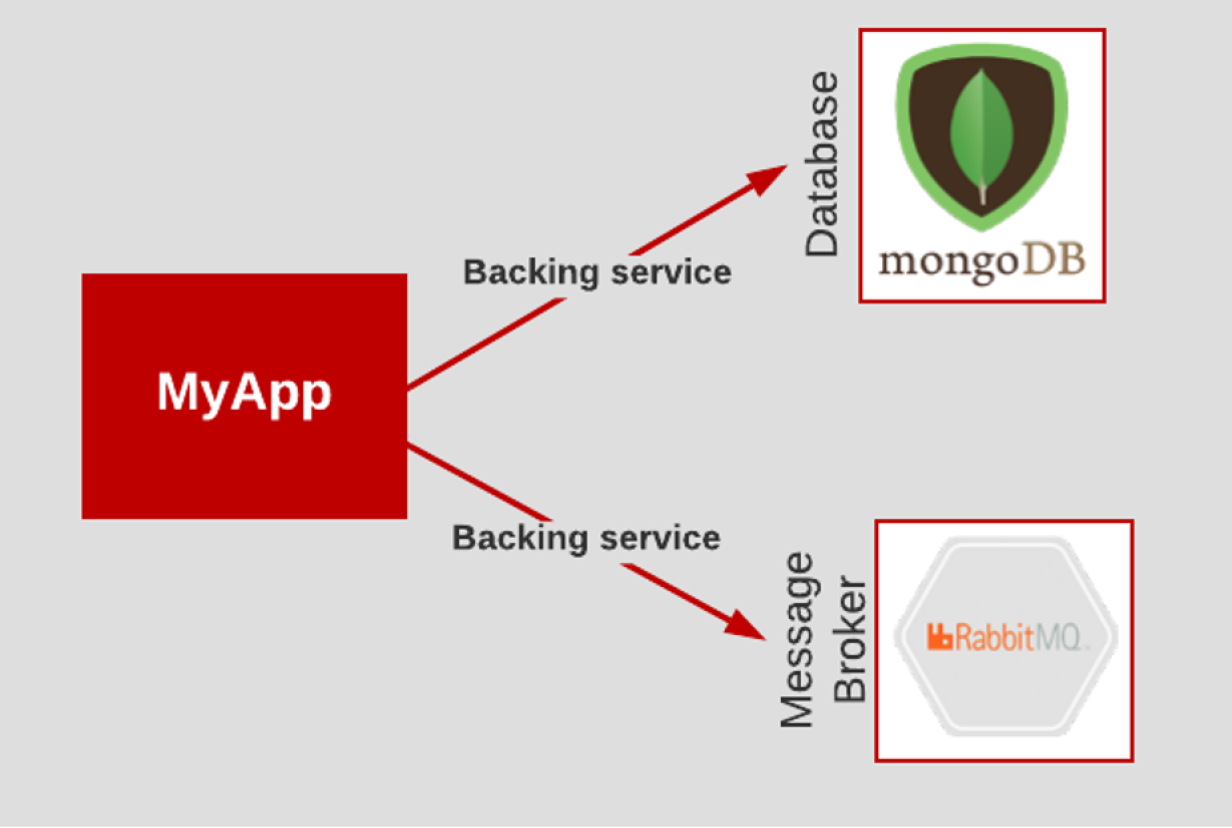
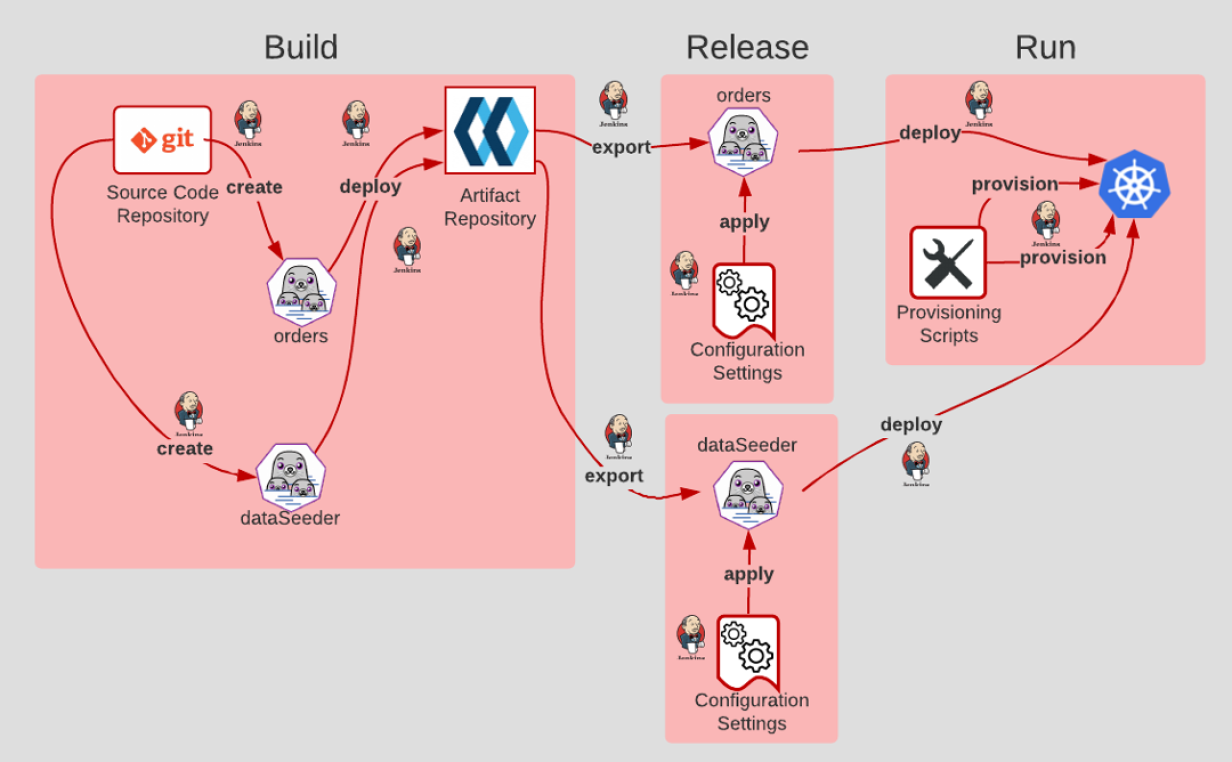
3.18 Build, release, run
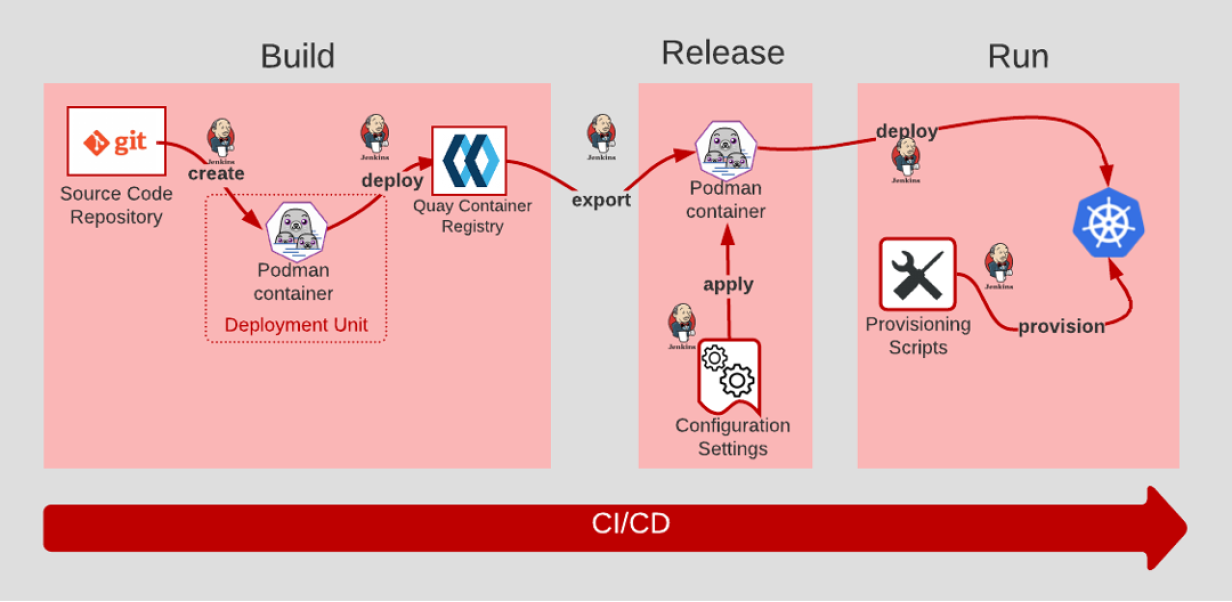
- The Build stage is where code is retrieved from the source code management system and built/compiled into artifacts.
- After the code is built, configuration settings are applied in the Release stage.
- Then, in the Run stage, a runtime environment is provisioned via scripts. The application and its dependencies are deployed into the newly provisioned runtime environment.
- The key to Build, Release, and Run is that the process is completely ephemeral. Should anything in the pipeline be destroyed, all artifacts and environments can be recreated from scratch using source code repository.
3.19 Processes
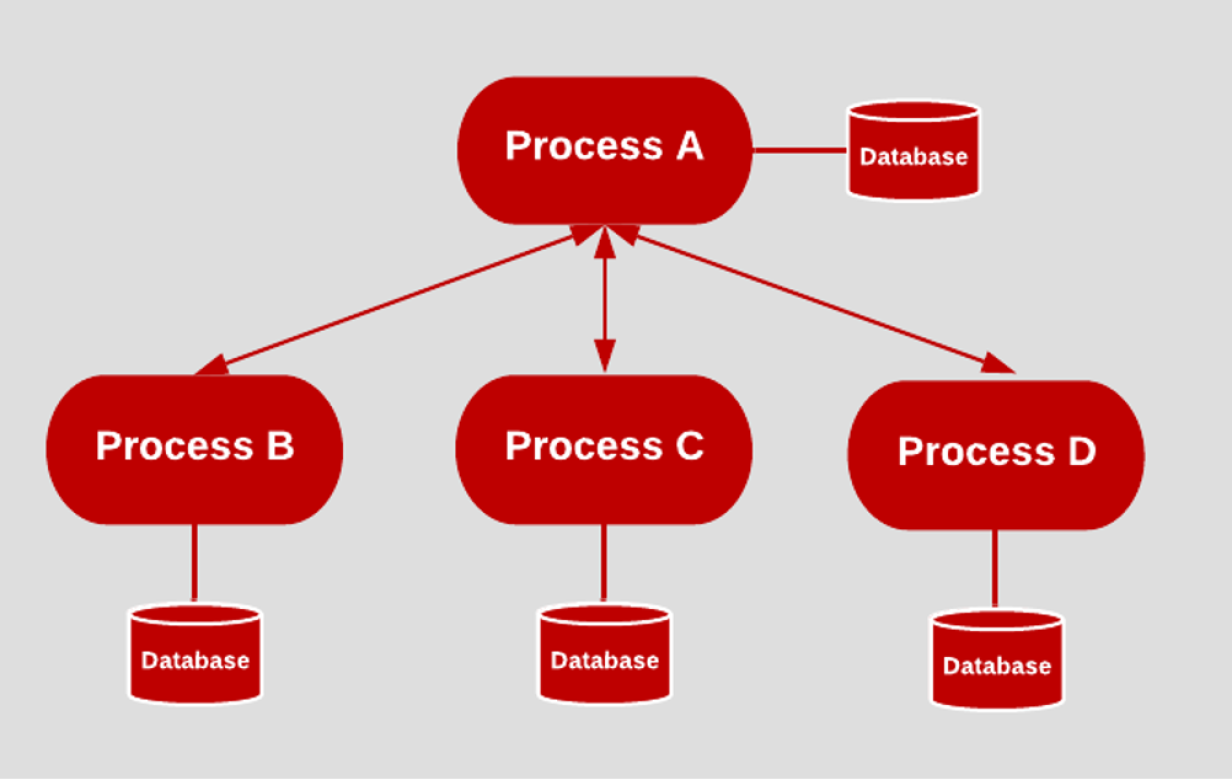
Applications should be deployed as one or more stateless processes with persisted data stored on a backing service. This means that no single process keeps track of the state of another process and that no process keeps track of information such as session or workflow status. A stateless process makes scaling easier.
3.20 Dev/Prod parity
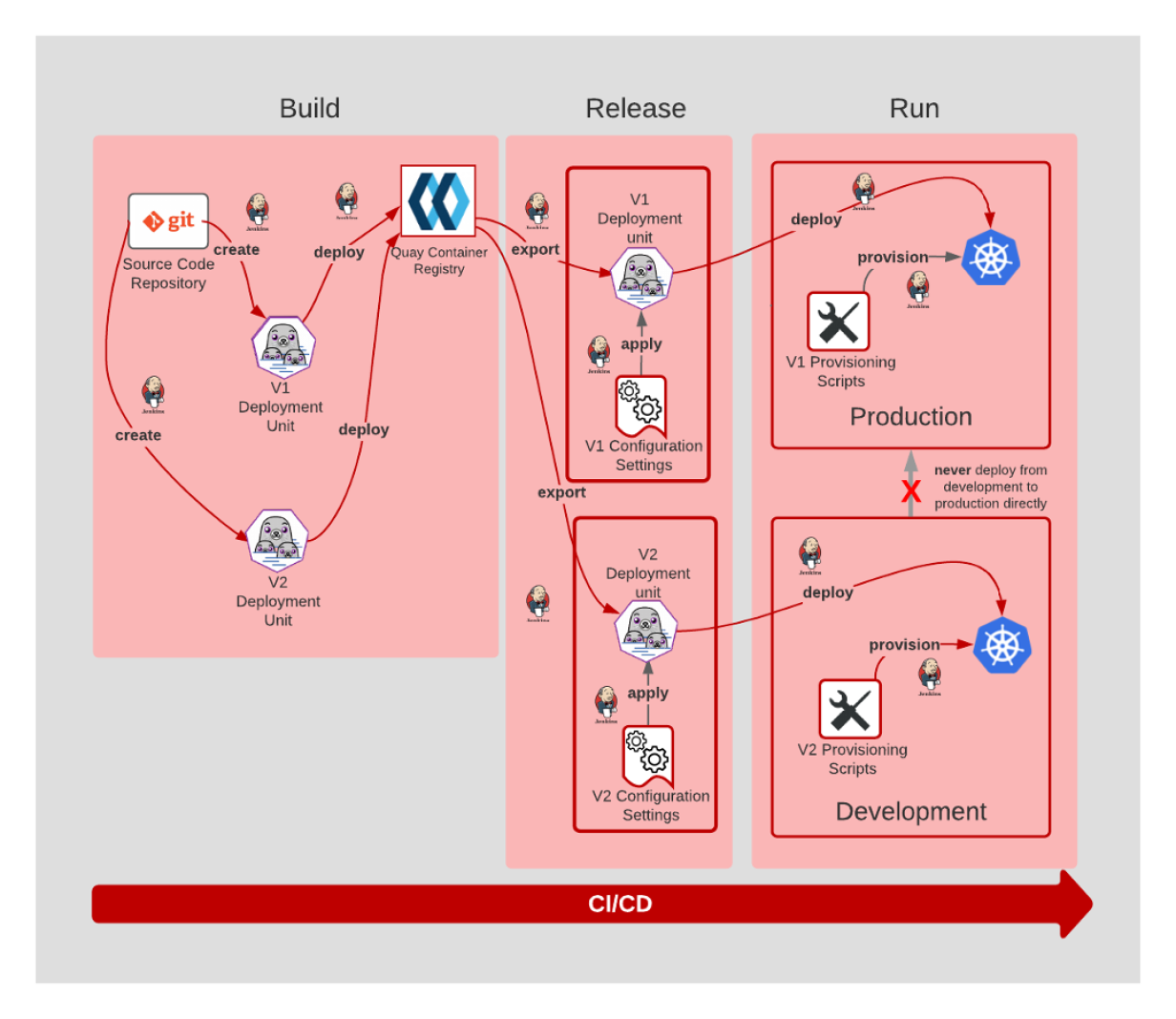
All environments should be as similar as possible
3.21 Logs
Applications should produce logs as event streams and leave the execution environment to aggregate. 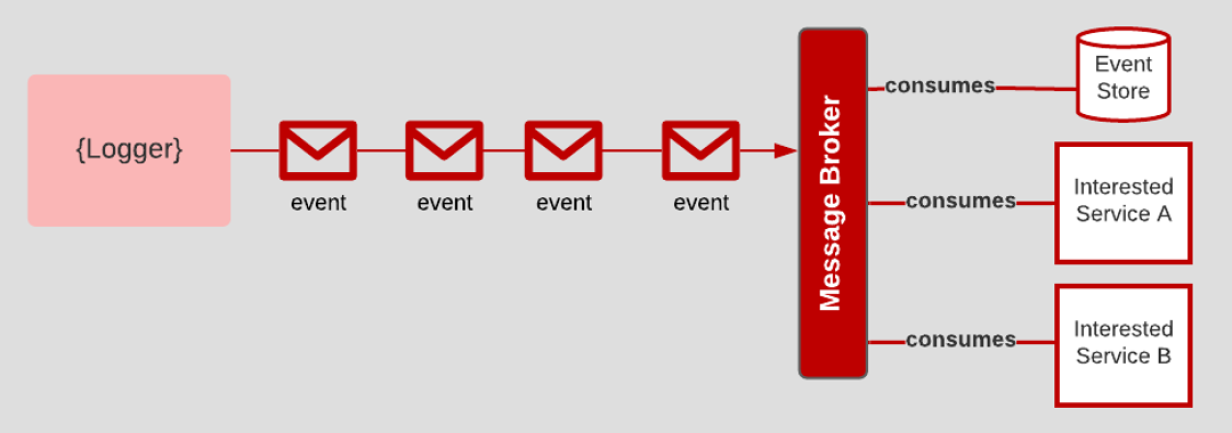
3.22 Admin Processes
- Any needed admin tasks should be kept in source control and packaged with the application.
- Admin processes are first-class citizens in the software development lifecycle and need to be treated as such.
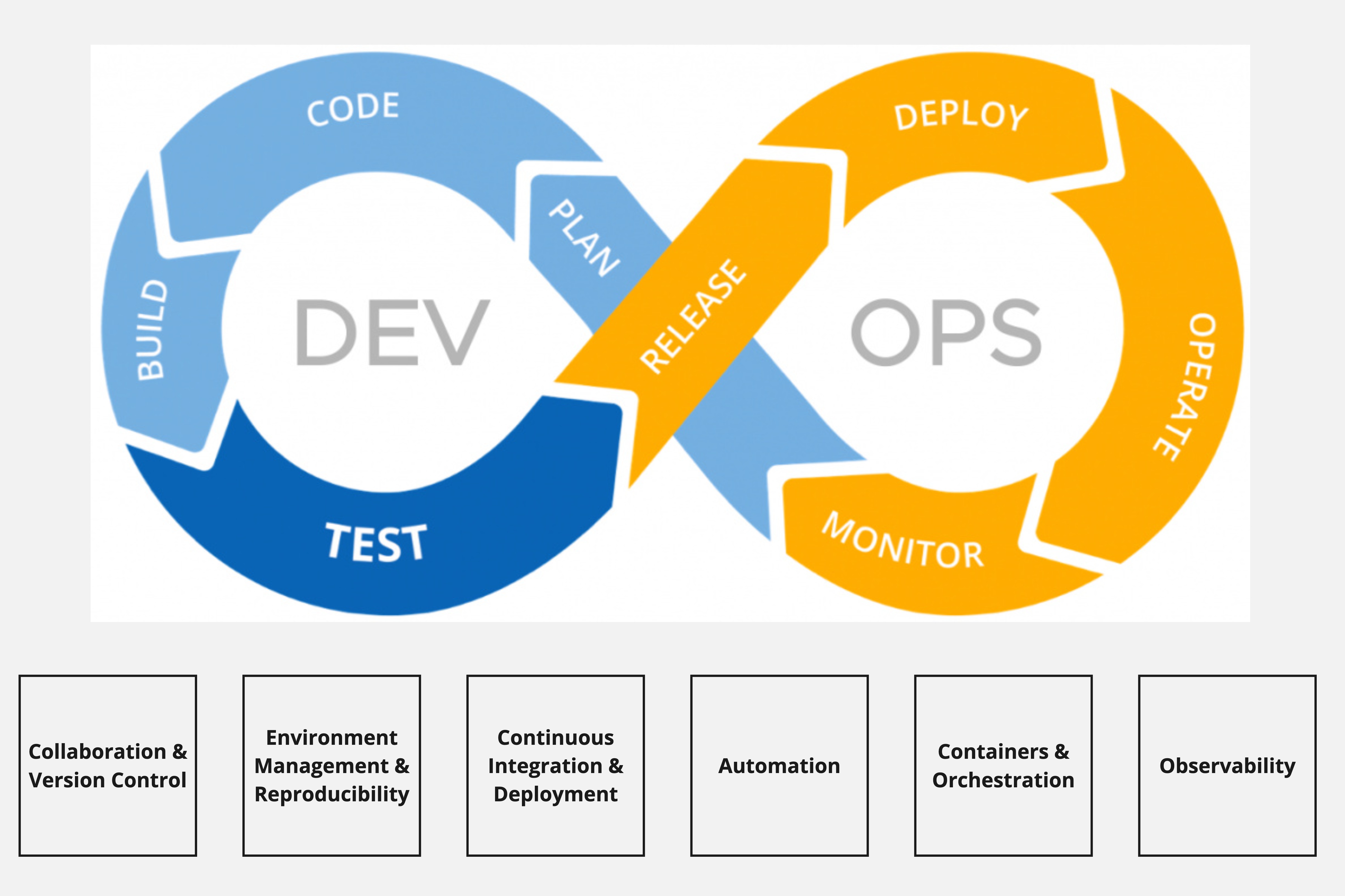
3.23 A simplified framework for tools
3.24 Version Control & Collaboration
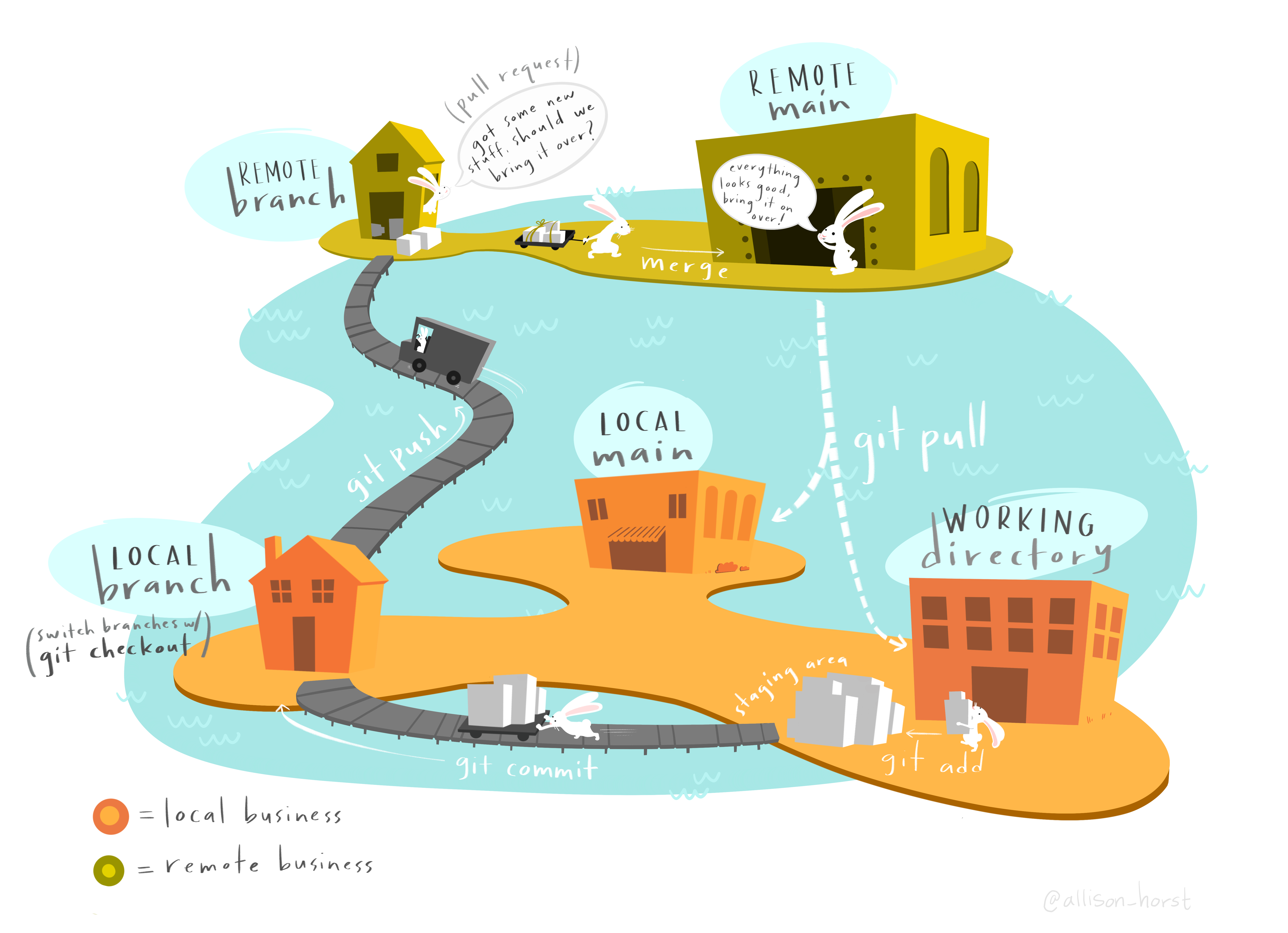
A complete history of every file, which enables you to go back to previous versions to analyze the source of bugs and fix problems in older versions.
Branching and Merging: The ability to work on independent streams of changes, which allows you to merge that work back together and verify that your changes conflict.
Traceability: The ability to trace each change with a message describing the purpose and intent of the change and connect it to project management and bug tracking software.
Centralized single source of truth
In addition to the action of promoting your code - its also important to have processes in place for how the code integration process occurs - includes humans coming together and making some decisions -
e.g code reviews, process for your team, how to name things, pull requests, merging, feature branching, automatic tests
3.25 ✏️ Your turn
3.26 Environment Management & Reproducibility
3.27 💬 Discussion
What are the layers that need to be reproduced across your dev, test, and prod environments?
What’s your most difficult reproducibility challenge?
3.28 Layers of reproducibility
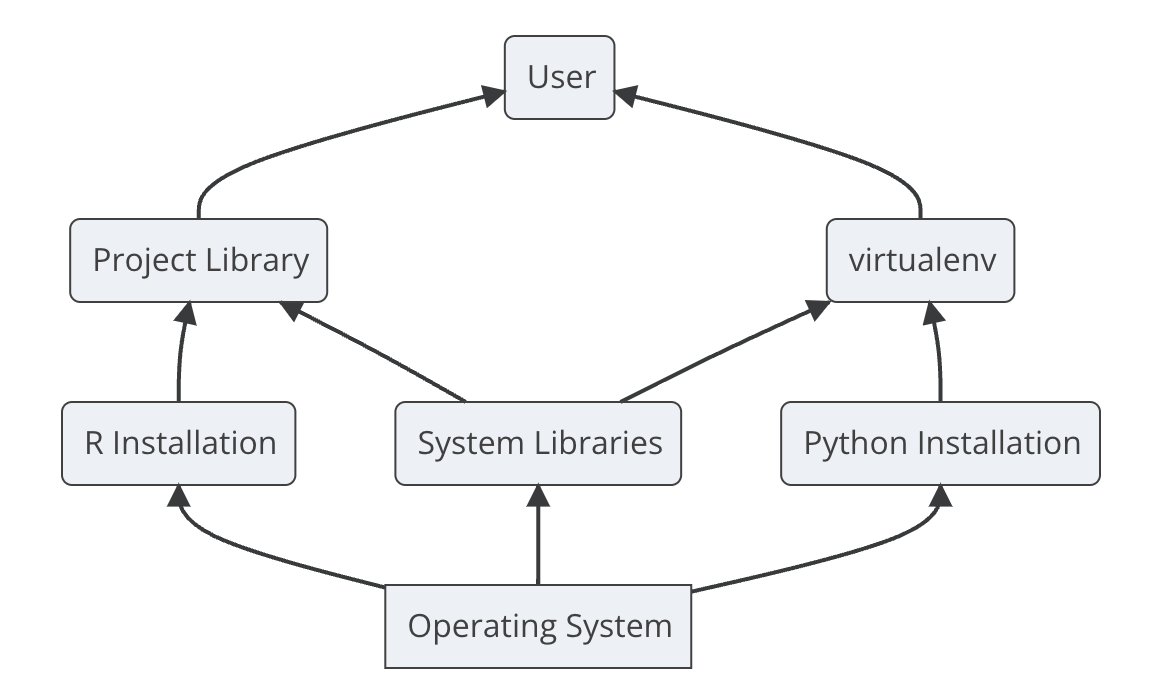
- code - scripts, configs, applications
- Packages
- System - r and python depend on underlying system software - for example, spatial analysis packages, or anything that requires Java - rJava
- OS
- Hardware - processors Intel chip, silicon chip
3.29 Packages vs. Libraries vs. Repositories
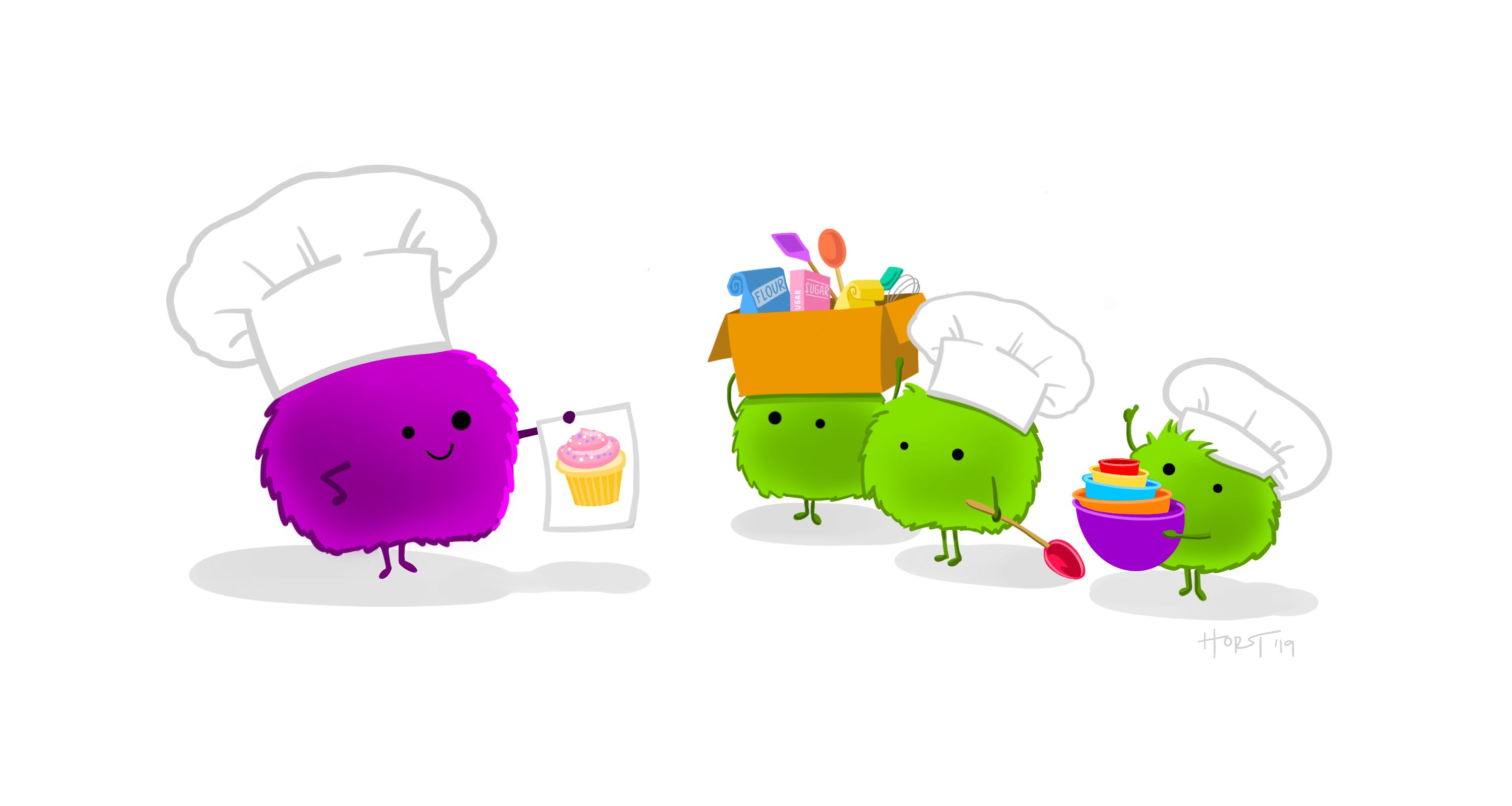
Think of your data science workbench as a kitchen:
- The repository is the grocery store, a central place where everyone gets their packages.
- The library is the pantry, where you keep your own private set of packages.
- Installation is the shopping trip to stock your library with packages (e.g.ingredients) from the repository.
3.30 Managing Environments
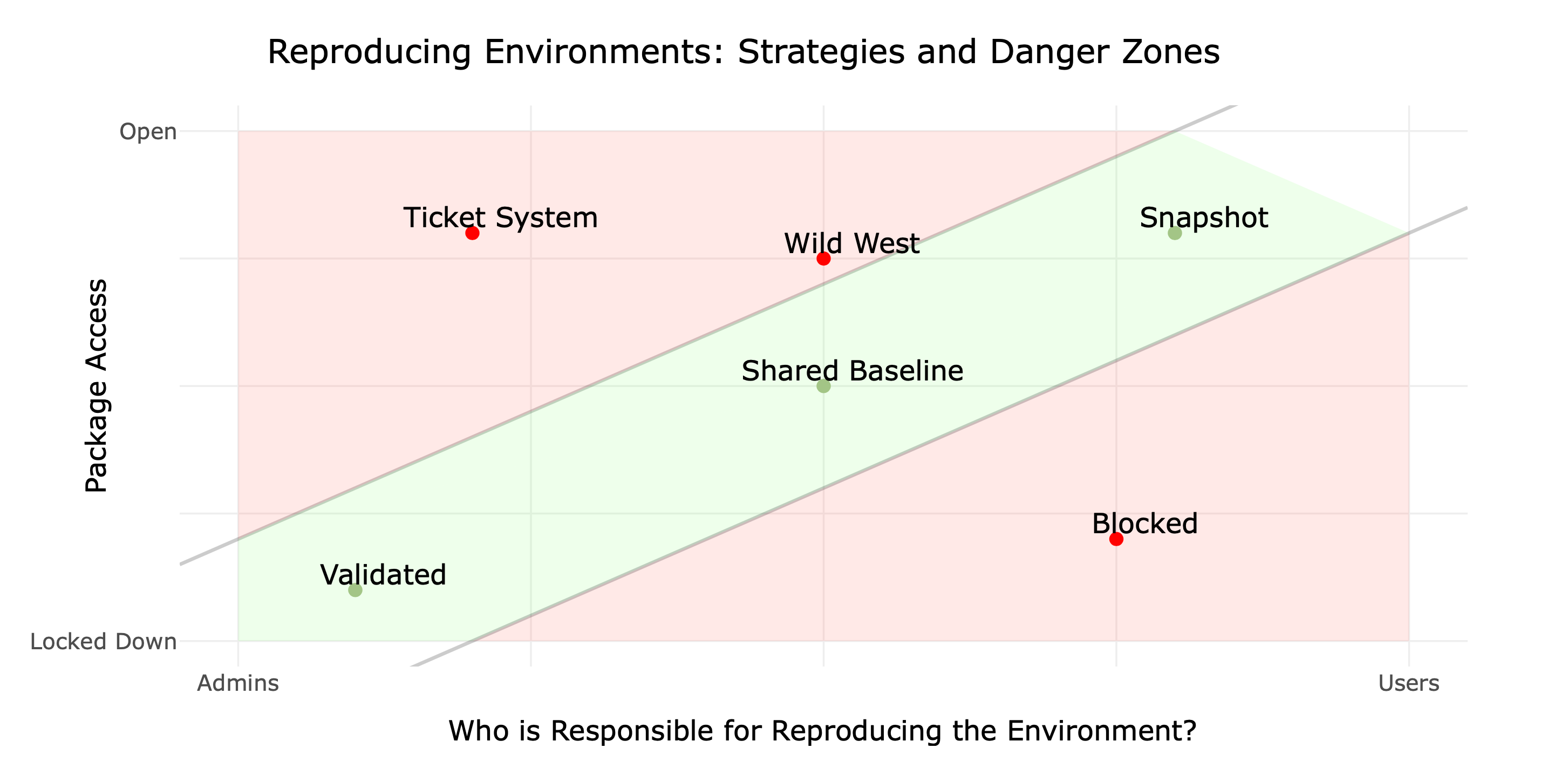
3.31 Virtual Environments
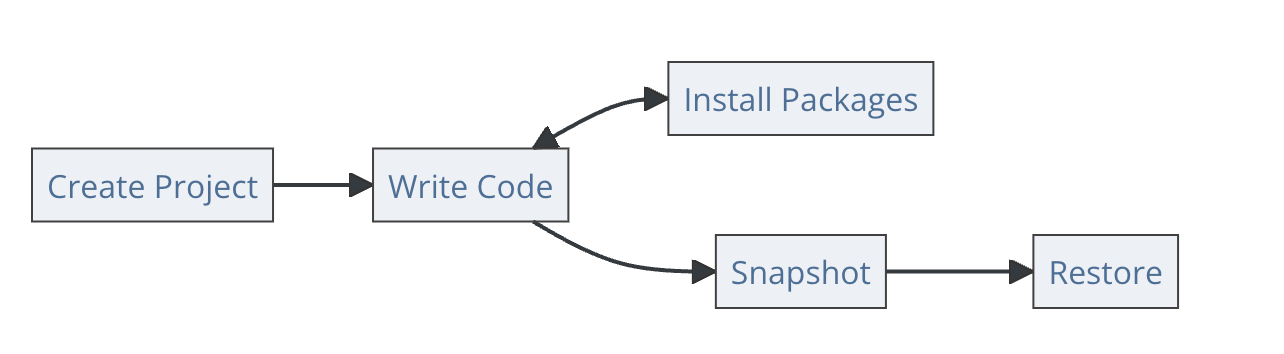
install.packages("renv")
renv::init()
renv::snapshot()
python -m venv .venv
source .venv/bin/activate
pip freeze > requirements.txt3.32 ✏️ Your turn
3.33 Continuous Integration & Delivery
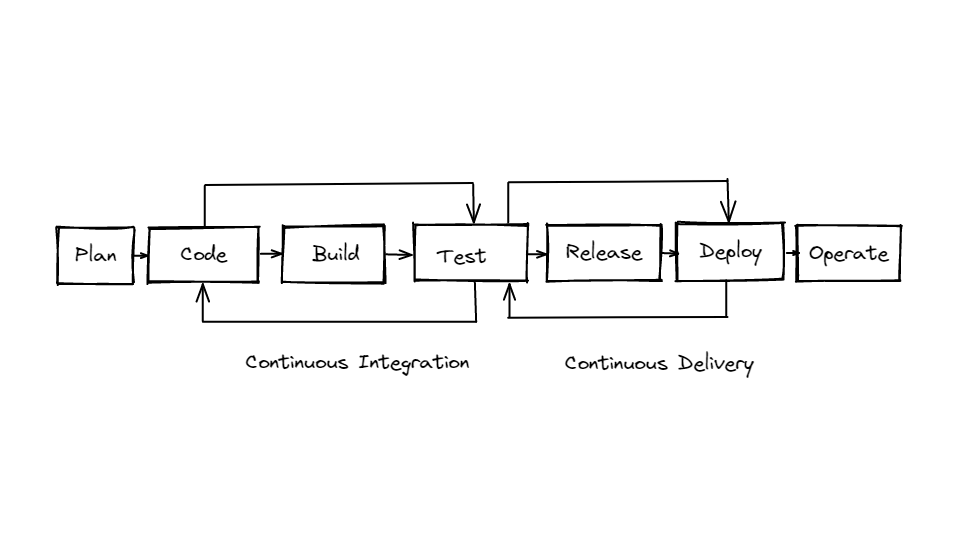
As we discussed before CI/CD is an iterative cycle of small steps to quickly build, test, and deploy your code - this is a critical component of devops.
So CI/CD is often said in the same breath - as it makes up a continuous pipeline - but its actually pretty discrete parts so I want to make sure we understand how they differ.
-Continuous integration (CI) - this is where you or anyone who writes code, automatically builds, tests, and commits code changes into a shared repository; This is usually triggered by an automatic process where the code is built, tested and then either passes or fails. This step is focused on improving the actual build or application as quickly as possible.
Different types of tests - from unit tests to integration tests to regression tests.
-Continuous delivery (CD) and deployment are less focused on the build but on the actual installation and distribution of your build. This includes an automated process to deploy across different environments - from development to testing and finally to production. Delivery is the process for the final release - that “push of a button step” to get to prod.
3.34 From CI to delivery & deployment
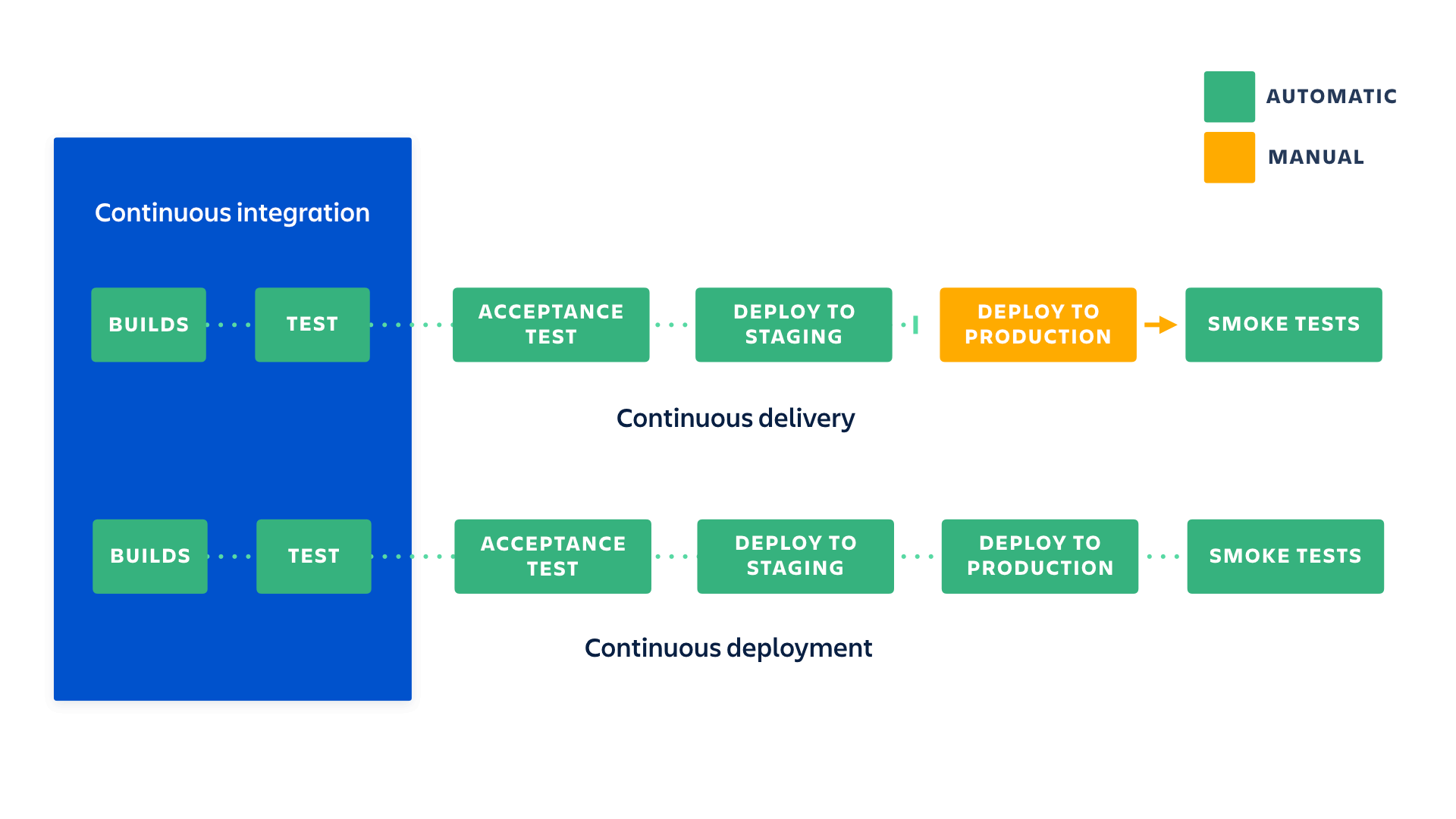
continuous integration is part of both continuous delivery and continuous deployment. And continuous deployment is like continuous delivery, except that releases happen automatically
Both Continuous Delivery and Continuous Deployment aim to increase the speed, frequency, and reliability of software releases, but they differ in the level of automation and control over the deployment process. The choice between the two approaches depends on the team’s needs, the nature of the software, and the organisation’s risk tolerance.
3.35 Defining Production
When other people are using your:
- data
- app
- api
- dashboard
- model
3.36 Production Quality
- Correct: the data product works as expected
- Available: unplanned outages are rare or nonexistent
- Safe: data, functionality, and code are all kept safe from unauthorized users or unintended alteration
- Snappy: fast response times, ability to predict needed capacity for expanded traffic
- Sturdy: design and test to minimize the likelihood that changes will break things
3.37 Building environments for CI/CD
| Development | Testing | Production |
|---|---|---|
|
|
|
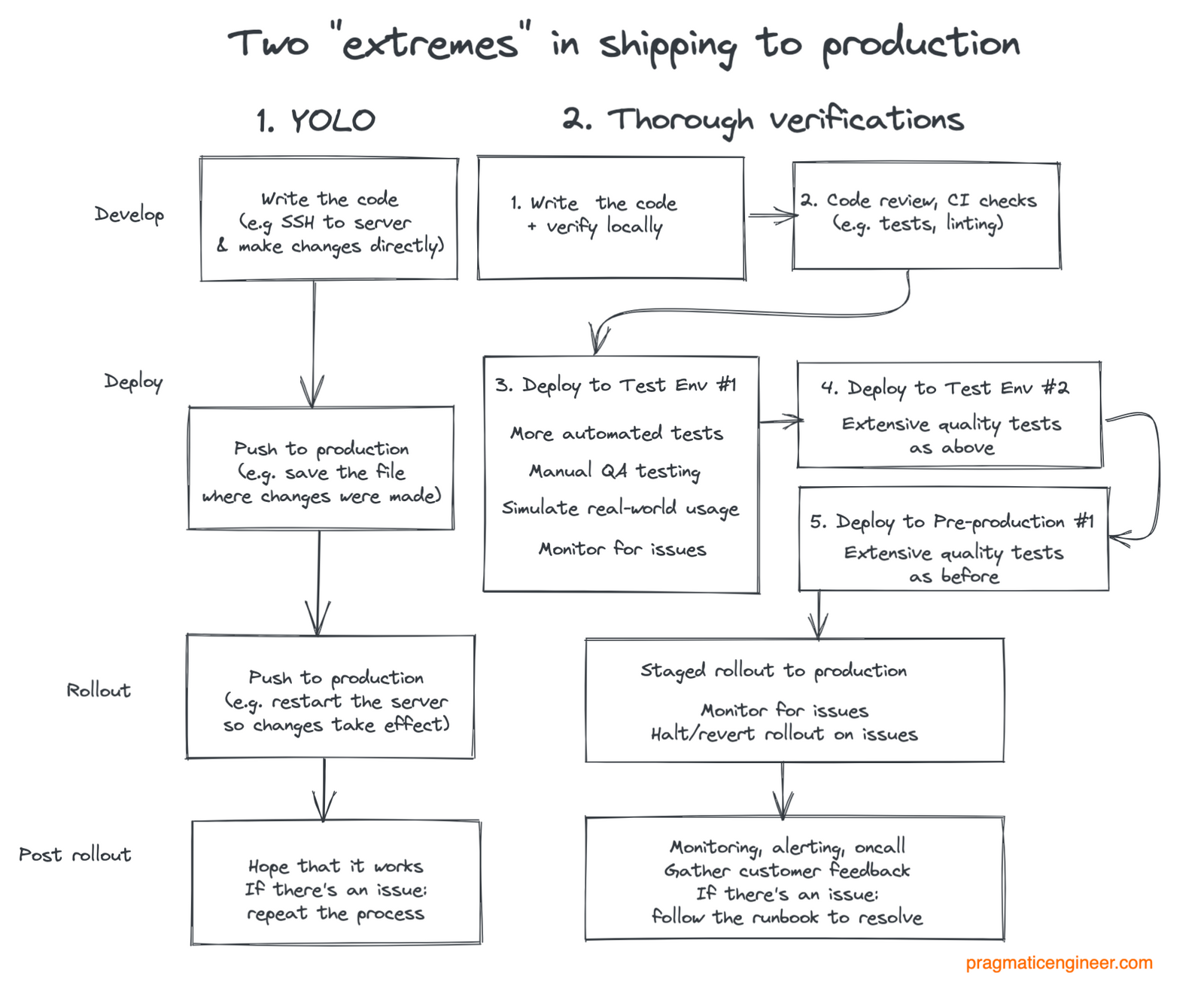
3.38 Shipping to Production
3.39 Importance of Testing
3.40 Types of Testing
| Type | What it tests |
|---|---|
| Unit | Do (small) individual bits of code work as they should? |
| Integration | Do all the pieces work together? E.g. (model + API + app +db) |
| Functional | Do outputs follow business logic and rules? Does the data look as it should? Are models outputting correct information |
| End-to-end | Replicates and tests behavior from beginning to end including user interaction |
| User Acceptance | Looking for bugs, inconsistencies, errors, from end-user perspective |
| Quality Assurance | Looking for bugs, inconsistencies, errors, from risk, product perspective |
| Performance/Optimization | Are applications reliable, fast, scalable, and responsive |
| Smoke test/canary test | Does the application break anything? |
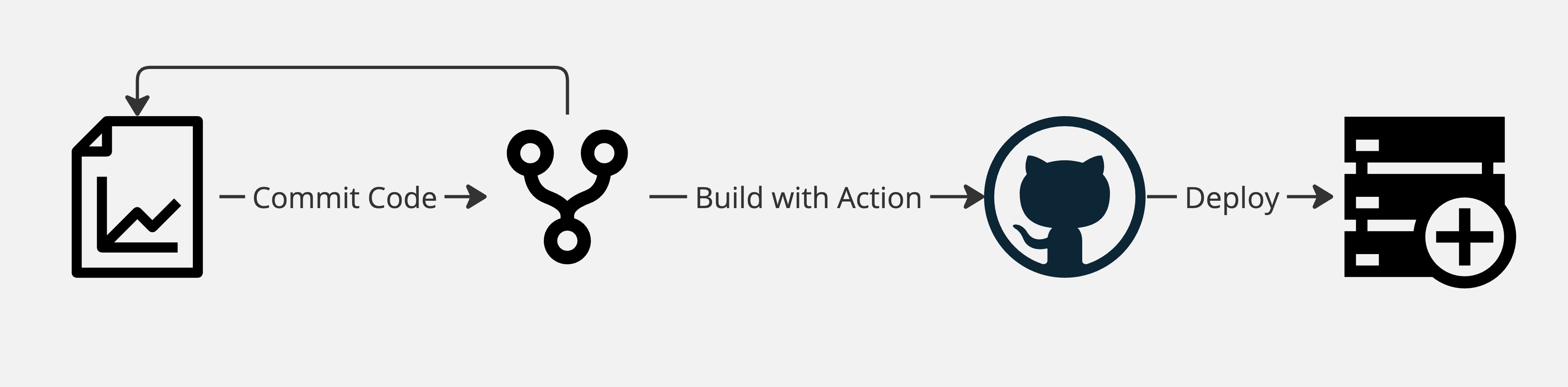
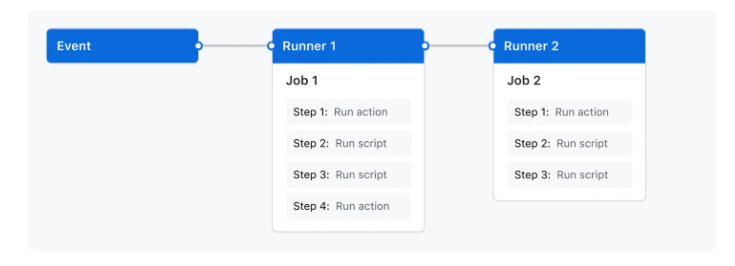
3.41 Github Actions for CI/CD
3.42 🔍 GHA Syntax
---

name: learn-github-actions

# Specifies the trigger for this workflow. This example uses the `push` event, so a workflow run is triggered every time someone pushes a change to the repository or merges a pull request.
on: [push]

# Groups together all the jobs that run in the `learn-github-actions` workflow
jobs:

# Defines a job named `check-bats-version`. Bats refers to Bash Automated Testing.
  check-bats-version:

# Configures the job to run on the latest version of an Ubuntu Linux runner. This means that the job will execute on a fresh virtual machine hosted by GitHub.
    runs-on: ubuntu-latest

# Groups together all the steps that run in the `check-bats-version` job. Each item nested under this section is a separate action or shell script.
    steps:

# The `uses` keyword specifies that this step will run `v4` of the `actions/checkout` action. This is an action that checks out your repository onto the runner, allowing you to run scripts or other actions against your code (such as build and test tools). You should use the checkout action any time your workflow will use the repository's code.
      - uses: actions/checkout@v4

# This step uses the `actions/setup-node@v4` action to install the specified version of the Node.js. (This example uses version 20.)
      - uses: actions/setup-node@v4
        with:
          node-version: '20'

# The `run` keyword tells the job to execute a command on the runner. In this case, you are using `npm` to install the `bats` software testing package.
      - run: npm install -g bats

# Finally, you'll run the `bats` command with a parameter that outputs the software version.
      - run: bats -v
---
3.43 Power of YAML
YAML Ain’t Markup Language
communication of data between people and computers
human friendly
configures files across many execution environments
3.44 YAML Syntax
EmpRecord:
  emp01:
    name: Michael
    job: Manager
    skills:
      - Improv
      - Public speaking
      - People management
  emp02:
    name: Dwight
    job: Assistant to the Manager
    skills:
      - Martial Arts
      - Beets
      - Sales
whitespace indentation denotes structure & hierarchy
Colons separate keys and their values
Dashes are used to denote a list
3.45 Open source ecosystem of actions
3.46 🔍 Test and Publish to Connect
---
name: test-and-connect-publish
on:
  push:
    branches: [main]
  pull_request:
    branches: [main]

jobs:
  test-and-connect-publish:
    runs-on: ubuntu-22.04
    steps:
      - uses: actions/checkout@v2

      - uses: r-lib/actions/setup-pandoc@v2

      - uses: r-lib/actions/setup-r@v2
        with:
          r-version: 4.2.3
          use-public-rspm: true

      - uses: r-lib/actions/setup-renv@v2

      - name: Test Shiny App
        shell: Rscript {0}
        run: |
          shinytest2::test_app()

      - name: Create manifest.json
        shell: Rscript {0}
        run: |
          rsconnect::writeManifest()

      - name: Publish Connect content
        uses: rstudio/actions/connect-publish@main
        with:
          url: ${{ secrets.CONNECT_SERVER }}
          api-key: ${{ secrets.CONNECT_API_KEY }}
          access-type: logged_in
          dir: |
            .:/shiny-app-demo-cicd-github-actions
---
Workflows can include tests, markdown renders, shell scripts, cron jobs, or deployments. They can be as simple or as complicated as you need. Open-source community provides a ton of examples of actions.
3.47 🔍 Style R code - https://styler.r-lib.org/
---
on:
  push:
    paths: ["**.[rR]", "**.[qrR]md", "**.[rR]markdown", "**.[rR]nw", "**.[rR]profile"]

name: style.yaml

permissions: read-all

jobs:
  style:
    runs-on: ubuntu-latest
    permissions:
      contents: write
    env:
      GITHUB_PAT: ${{ secrets.GITHUB_TOKEN }}
    steps:
      - name: Checkout repo
        uses: actions/checkout@v4
        with:
          fetch-depth: 0

      - name: Setup R
        uses: r-lib/actions/setup-r@v2
        with:
          use-public-rspm: true

      - name: Install dependencies
        uses: r-lib/actions/setup-r-dependencies@v2
        with:
          extra-packages: any::styler, any::roxygen2
          needs: styler

      - name: Enable styler cache
        run: styler::cache_activate()
        shell: Rscript {0}

      - name: Determine cache location
        id: styler-location
        run: |
          cat(
            "location=",
            styler::cache_info(format = "tabular")$location,
            "\n",
            file = Sys.getenv("GITHUB_OUTPUT"),
            append = TRUE,
            sep = ""
          )
        shell: Rscript {0}

      - name: Cache styler
        uses: actions/cache@v4
        with:
          path: ${{ steps.styler-location.outputs.location }}
          key: ${{ runner.os }}-styler-${{ github.sha }}
          restore-keys: |
            ${{ runner.os }}-styler-
            ${{ runner.os }}-

      - name: Style
        run: styler::style_pkg()
        shell: Rscript {0}

      - name: Commit and push changes
        run: |
          if FILES_TO_COMMIT=($(git diff-index --name-only ${{ github.sha }} \
              | egrep --ignore-case '\.(R|[qR]md|Rmarkdown|Rnw|Rprofile)$'))
          then
            git config --local user.name "$GITHUB_ACTOR"
            git config --local user.email "$GITHUB_ACTOR@users.noreply.github.com"
            git commit ${FILES_TO_COMMIT[*]} -m "Style code (GHA)"
            git pull --ff-only
            git push origin
          else
            echo "No changes to commit."
          fi
---
3.48 🔍 Test Coverage
---

on:
  push:
    branches: [main, master]
  pull_request:
    branches: [main, master]

name: test-coverage.yaml

permissions: read-all

jobs:
  test-coverage:
    runs-on: ubuntu-latest
    env:
      GITHUB_PAT: ${{ secrets.GITHUB_TOKEN }}

    steps:
      - uses: actions/checkout@v4

      - uses: r-lib/actions/setup-r@v2
        with:
          use-public-rspm: true

      - uses: r-lib/actions/setup-r-dependencies@v2
        with:
          extra-packages: any::covr, any::xml2
          needs: coverage

      - name: Test coverage
        run: |
          cov <- covr::package_coverage(
            quiet = FALSE,
            clean = FALSE,
            install_path = file.path(normalizePath(Sys.getenv("RUNNER_TEMP"), winslash = "/"), "package")
          )
          covr::to_cobertura(cov)
        shell: Rscript {0}

      - uses: codecov/codecov-action@v4
        with:
          fail_ci_if_error: ${{ github.event_name != 'pull_request' && true || false }}
          file: ./cobertura.xml
          plugin: noop
          disable_search: true
          token: ${{ secrets.CODECOV_TOKEN }}

      - name: Show testthat output
        if: always()
        run: |
          ## --------------------------------------------------------------------
          find '${{ runner.temp }}/package' -name 'testthat.Rout*' -exec cat '{}' \; || true
        shell: bash

      - name: Upload test results
        if: failure()
        uses: actions/upload-artifact@v4
        with:
          name: coverage-test-failures
          path: ${{ runner.temp }}/package
---
3.49 🔍 Code Linter
---

on:
  push:
    branches: [main, master]
  pull_request:
    branches: [main, master]

name: lint.yaml

permissions: read-all

jobs:
  lint:
    runs-on: ubuntu-latest
    env:
      GITHUB_PAT: ${{ secrets.GITHUB_TOKEN }}
    steps:
      - uses: actions/checkout@v4

      - uses: r-lib/actions/setup-r@v2
        with:
          use-public-rspm: true

      - uses: r-lib/actions/setup-r-dependencies@v2
        with:
          extra-packages: any::lintr, local::.
          needs: lint

      - name: Lint
        run: lintr::lint_package()
        shell: Rscript {0}
        env:
          LINTR_ERROR_ON_LINT: true
---
3.50 ✏️ Your turn
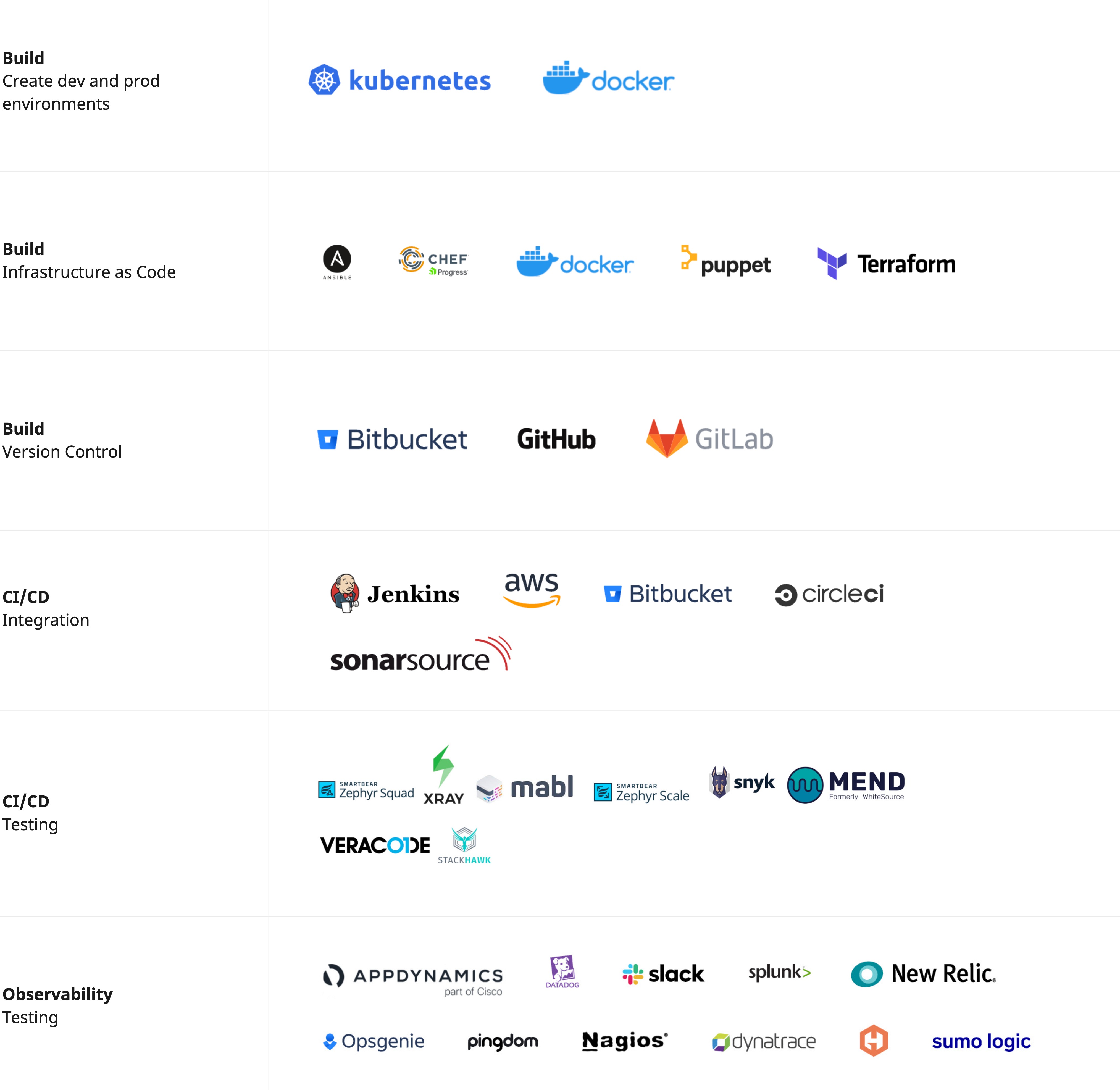
3.51 Automation Tasks
- Provisioning Infrastructure
- Testing & Monitoring
- Integration & deployment
3.52 Tools for Automation
3.53 💬 Discussion
Why should we automate the above tasks?
When should we NOT automate a task or process?
3.54 🔍 Pulumi Example
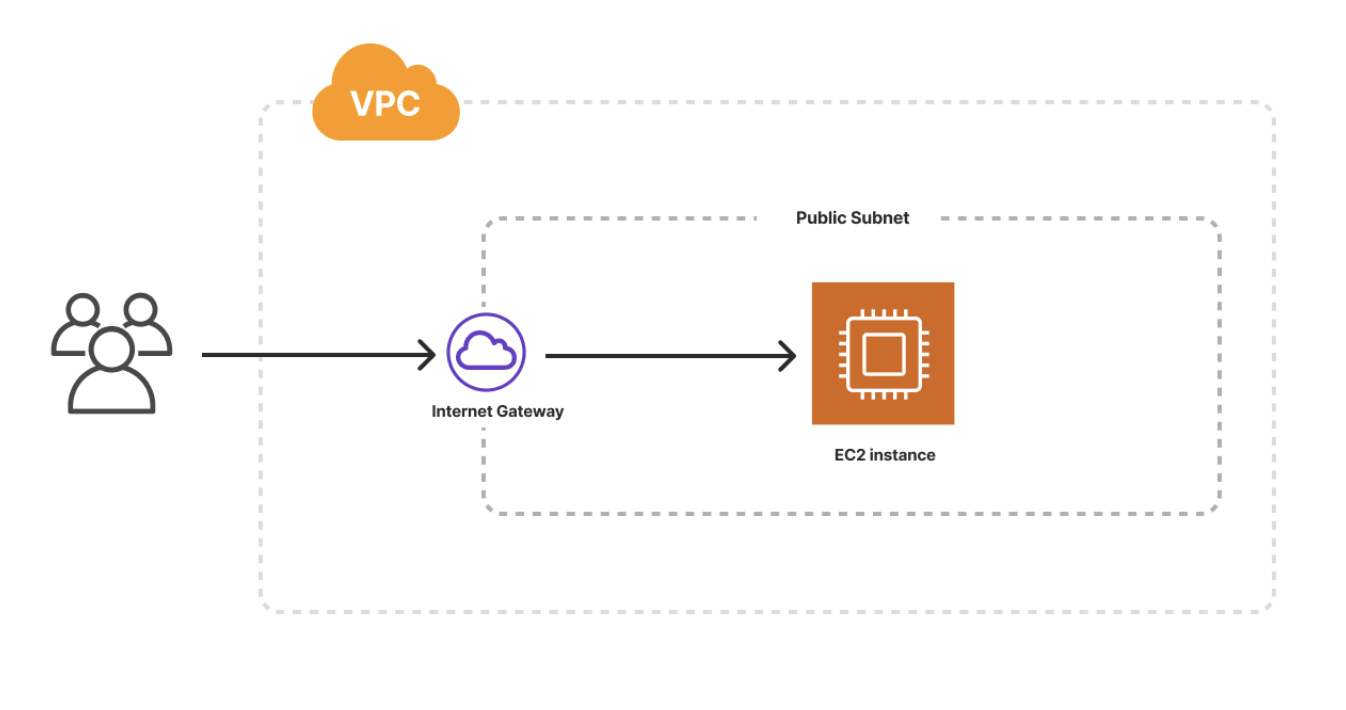
https://github.com/pulumi/examples/tree/master/aws-py-resources
3.55 Pre-commit hooks
- run before every commit
- configured in
.pre-commit-config.yaml - when should we NOT use a pre-commit hook?
- which tasks are useful to have in a pre-commit hook?
3.56 🔍 Before Black
from seven_dwwarfs import Grumpy, Happy, Sleepy, Bashful, Sneezy, Dopey, Doc
x = {  'a':37,'b':42,

'c':927}

x = 123456789.123456789E123456789

if very_long_variable_name is not None and \
 very_long_variable_name.field > 0 or \
 very_long_variable_name.is_debug:
 z = 'hello '+'world'
else:
 world = 'world'
 a = 'hello {}'.format(world)
 f = rf'hello {world}'
if (this
and that): y = 'hello ''world'#FIXME: https://github.com/psf/black/issues/26
class Foo  (     object  ):
  def f    (self   ):
    return       37*-2
  def g(self, x,y=42):
      return y
def f  (   a: List[ int ]) :
  return      37-a[42-u :  y**3]
def very_important_function(template: str,*variables,file: os.PathLike,debug:bool=False,):
    """Applies `variables` to the `template` and writes to `file`."""
    with open(file, "w") as f:
     ...
# fmt: off
custom_formatting = [
    0,  1,  2,
    3,  4,  5,
    6,  7,  8,
]
# fmt: on
regular_formatting = [
    0,  1,  2,
    3,  4,  5,
    6,  7,  8,
]
3.57 🔍 After Black
from seven_dwwarfs import Grumpy, Happy, Sleepy, Bashful, Sneezy, Dopey, Doc

x = {"a": 37, "b": 42, "c": 927}

x = 123456789.123456789e123456789

if (
    very_long_variable_name is not None
    and very_long_variable_name.field > 0
    or very_long_variable_name.is_debug
):
    z = "hello " + "world"
else:
    world = "world"
    a = "hello {}".format(world)
    f = rf"hello {world}"
if this and that:
    y = "hello " "world"  # FIXME: https://github.com/psf/black/issues/26


class Foo(object):
    def f(self):
        return 37 * -2

    def g(self, x, y=42):
        return y


def f(a: List[int]):
    return 37 - a[42 - u : y**3]


def very_important_function(
    template: str,
    *variables,
    file: os.PathLike,
    debug: bool = False,
):
    """Applies `variables` to the `template` and writes to `file`."""
    with open(file, "w") as f:
        ...


# fmt: off
custom_formatting = [
    0,  1,  2,
    3,  4,  5,
    6,  7,  8,
]
# fmt: on
regular_formatting = [
    0,
    1,
    2,
    3,
    4,
    5,
    6,
    7,
    8,
]
3.58 ✏️ Your turn
3.59 Orchestration
We want to observe…
Operations
Correctness
Internal state
Data Flow & Lineage
Errors
3.60 Logging
- recording execution of your code to stout or log file
- like
printstatements but for production - useful for long running processes
- when you can’t simply stop the workflow
3.61 What to log
- functions/jobs/tests have executed correctly or incorrectly
- error messages
- inputs and output of a function or job
- where things have been saved
3.62 Log Levels
Debug: detail on what the code was doing
Info: something normal happened in the app
Warn/Warning: an unexpected application issue that isn’t fatal
Error: an issue that will make an operation not work, but that won’t crash your app.
Critical: an error so big that the app itself shuts down.
3.63 🔍Logging in R
library(log4r)

# Configure your logging file
my_logfile = "my_logfile.txt"

# Configure your console and file layout

my_console_appender = console_appender(layout = default_log_layout())
my_file_appender = file_appender(my_logfile, append = TRUE,
                            layout = default_log_layout())

# the log severity you are using
my_logger <- log4r::logger(threshold = "INFO",
                appenders= list(my_console_appender,my_file_appender))

# functions that you will add into your script
log4r_info <- function() {
  log4r::info(my_logger, "Info_message.")
}

log4r_error <- function() {
  log4r::error(my_logger, "Error_message")
}

log4r_debug <- function() {
  log4r::debug(my_logger, "Debug_message")
}log4r_debug() # will not trigger log entry because threshold was set to INFO
log4r_info()
#> INFO [2024-09-01 12:30:05] Info_message.
log4r_error()
#> ERROR [2024-09-01 12:30:05] Error_message
readLines(my_logfile)
#> [1] "INFO [2024-09-01 12:30:05] Info_message."
#> [2] "ERROR [2024-09-01 12:30:05] Error_message"3.64 🔍Logging in Python
import logging

# get or create logger
logger = logging.getLogger(__name__)
# set log level
logger.setLevel(logging.WARNING)

# define file handler and set formatter
file_handler = logging.FileHandler('logfile.log')
formatter    = logging.Formatter('%(asctime)s : %(levelname)s : %(name)s : %(message)s')
file_handler.setFormatter(formatter)

# add file handler to logger
logger.addHandler(file_handler)

# Logs
logger.debug('A debug message')
logger.info('An info message')
logger.warning('Something is not right.')
logger.error('A Major error has happened.')
logger.critical('Fatal error. Cannot continue')logging.debug("debug_message") # will not trigger log entry because threshold was set to INFO
#> 2024-09-01 12:30:05,797 : WARNING : __main__ : Something is not right.
#> 2024-09-01 12:30:05,798 : ERROR : __main__ : A Major error has happened.
#> 2024-09-01 12:30:05,798 : CRITICAL : __main__ : Fatal error. Cannot continue3.65 Containers & Orchestration
- Consistency: ensure that applications run the same way across different environments.
- Isolation: isolate applications and their dependencies, preventing conflicts.
- Portability: run on any system that supports container, reducing “it works on my machine” issues.
3.66 Benefits
- allows you to package up everything you need to reproduce an environment/application
- lightweight system without much overhead
- share containers with colleagues without requiring them to have to set up their own local machines
- quick testing and debugging
- allows you to easily version snapshots of your work
- scaling up with limited local compute
- Create isolated environments for different experiments.
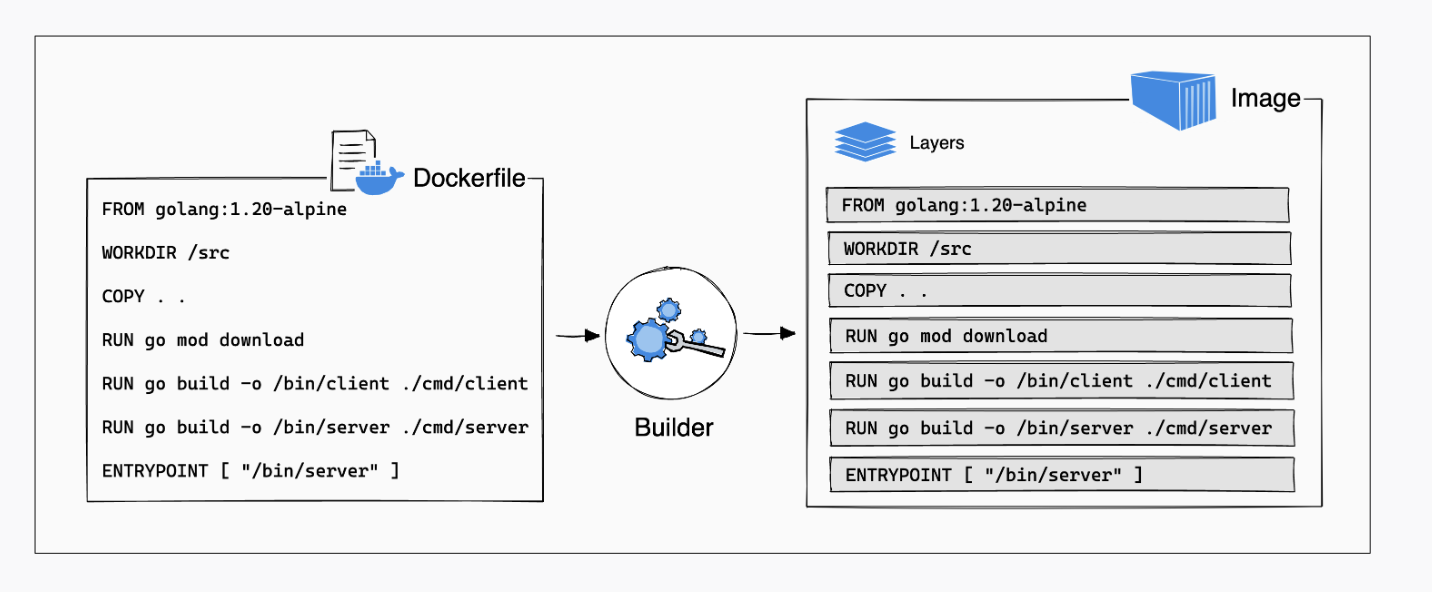
3.67 Containerization with Docker
Isolation of applications inside individual OS-based environments inside virtual machines or physical servers
Super lightweight and fast to spin-up (much faster than a VM)
Made up of individual layers so its really quick to build
Can build isolated applications from their own image
Containers are immutable and ephemeral
3.68 Orchestration with Kubernetes
orchestrate multiple virtual machines or nodes to run in sync with each other
a set of building blocks (“primitives”) that integrate well with other deployment platforms and are “extensible” through the K8s API
provides mechanisms to deploy, maintain and scale applications based on CPU, memory or custom metrics
3.69 How Docker works
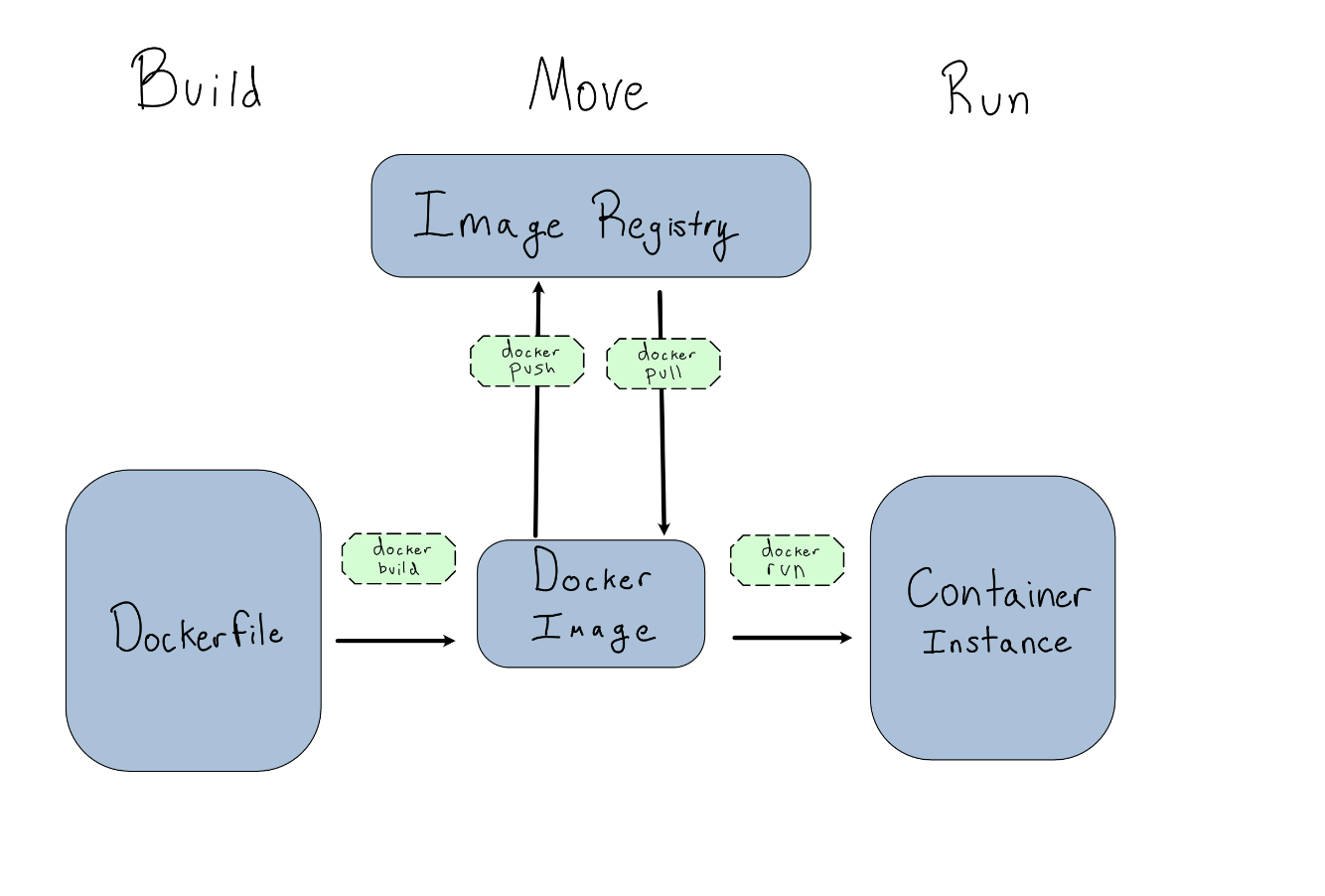
dockerfile - is a script of instructions for how to build an image
image - everything you need to run an application - all the layers that build the environment, dependencies, libraries, files
container - isolated instance of a running image. you can create, stop, start, restart, containers. When a container is removed/deleted any changes to its state that arent stored in some kind of persistent storage disappear. Called ephemeral container - Think of a container as a snapshot in time of a particular application.
Missing piece - repository - for images, like dockerhub, container registry cloud services, private registries
Build - Run - Push
3.70 ✏️ Your turn
 Instructions here
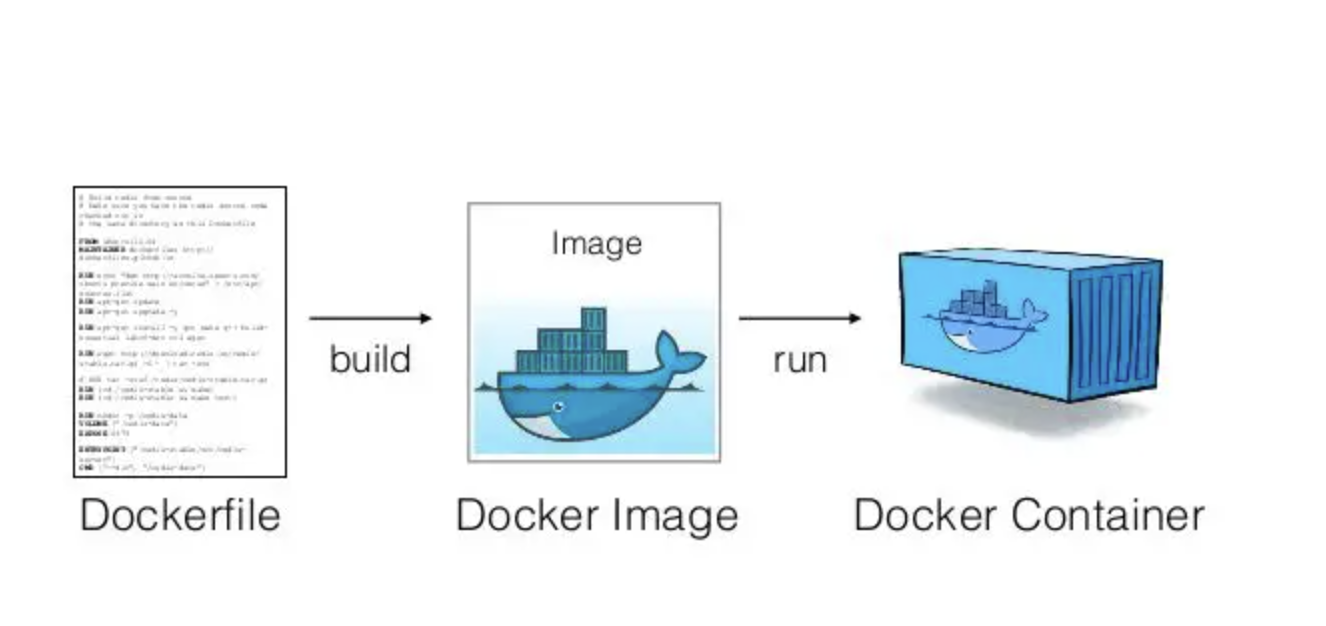
dockerfile - is a script of instructions for how to build an image
image - everything you need to run an application - all the layers that build the environment, dependencies, libraries, files
container - isolated instance of a running image. you can create, stop, start, restart, containers. When a container is removed/deleted any changes to its state that arent stored in some kind of persistent storage disappear. Called ephemeral container - Think of a container as a snapshot in time of a particular application.
Missing piece - repository - for images, like dockerhub, container registry cloud services, private registries
3.71 Modes for running containers
| Mode | Run command | Use case |
|---|---|---|
| Detached | docker run -d |
This runs the container in the background so the container keeps running until the application process exits, or you stop the container. Detached mode is often used for production purposes. |
| Interactive + terminal | docker run -it |
This runs the container in the foreground so you are unable to access the command prompt. Interactive mode is often used for development and testing. |
| Remove everything once the container is done with its task | docker run --rm |
This mode is used on foreground containers that perform short-term tasks such as tests or database backups. Once it is removed anything you may have downloaded or created in the container is also destroyed. |
3.72 Container Debugging
docker run -it -d ubuntu
docker container ls -a
docker exec -it CONTAINER_ID bash

docker container run -d --name mydb \
 --name mydb \
 -e MYSQL_ROOT_PASSWORD=my-secret-pw \
 mysql

 docker container logs mydb
3.73 ✏️ Your turn
3.74 Writing a Dockerfile
1. Determine your base image
2. Install application dependencies
3. Copy in any relevant source code and/or binaries
4. Configure the final image
3.75 Writing a Dockerfile
1. Determine your base image
FROM python:3.12
WORKDIR /usr/local/app
3.76 Writing a Dockerfile
2. Install application dependencies
COPY requirements.txt ./
RUN pip install --no-cache-dir -r requirements.txt
3.77 Writing a Dockerfile
3. Copy in any relevant source code and/or binaries
# Copy in the source code
COPY src ./src
EXPOSE 5000
3.78 Writing a Dockerfile
4. Run/Add any additional configurations and commands
# Setup an app user so the container doesn't run as the root user
RUN useradd app
USER app

CMD ["uvicorn", "app.main:app", "--host", "0.0.0.0", "--port", "8080"]
3.79 Writing a Dockerfile
FROM python:3.12
WORKDIR /usr/local/app

# Install the application dependencies
COPY requirements.txt ./
RUN pip install --no-cache-dir -r requirements.txt

# Copy in the source code
COPY src ./src
EXPOSE 5000

# Setup an app user so the container doesn't run as the root user
RUN useradd app
USER app

CMD ["uvicorn", "app.main:app", "--host", "0.0.0.0", "--port", "8080"]
3.80 Additional Dockerfile instructions
| Command | Description |
|---|---|
| ARG | Define variables passed at build time |
| FROM | Base image |
| ENV | Define variable |
| COPY | Add local file or directory |
| RUN | Execute commands during build process |
| CMD | Execute command when you run container; once per Dockerfile |
| ENTRYPOINT | Execute command to change default entrypoint at runtime |
| USER | Set username or ID |
| VOLUME | Mount host machine to container |
| EXPOSE | Specify port pn which container listens at runtime |
3.81 Docker in CI
---

jobs:
  build:
    runs-on: ubuntu-latest
    steps:
      -
        name: Checkout
        uses: actions/checkout@v3
      -
        name: Login to Docker Hub
        uses: docker/login-action@v2
        with:
          username: ${{ secrets.DOCKERHUB_USERNAME }}
          password: ${{ secrets.DOCKERHUB_TOKEN }}
      -
        name: Set up Docker Buildx
        uses: docker/setup-buildx-action@v2
      -
        name: Build and push
        uses: docker/build-push-action@v4
        with:
          context: .
          file: ./Dockerfile
          push: true
          tags: ${{ secrets.DOCKERHUB_USERNAME }}/latest
---
3.82 ✏️ Your turn
3.83 Let’s Take a Break!